Preferences and Troubleshooting
Issues in Blender Version 4.1 and earlier
Section titled “Issues in Blender Version 4.1 and earlier”In Blender version 4.1 and earlier, there’s a known issue where the preview text (highlighted at the picture below) doesn’t update in real-time as you type.
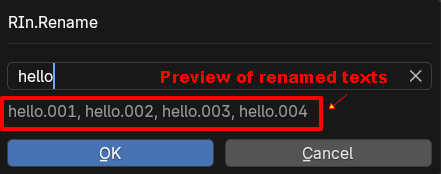
Preview renamed textsTo work around this, you can disable the preview text and instead rely on the Heads-Up Display (HUD) in the bottom-left corner of the 3D view.
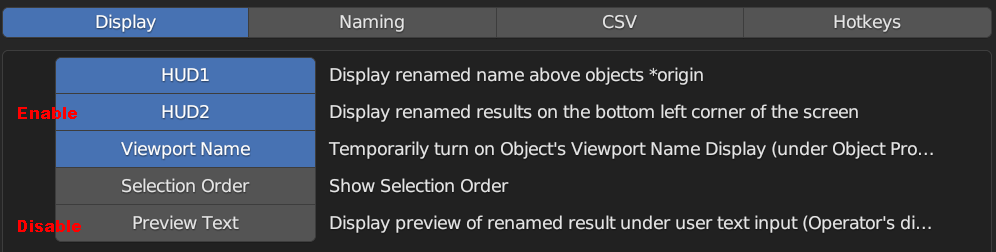
HUD2, Turn Off Preview TextPreferences
Section titled “Preferences”Naming Tab
Section titled “Naming Tab”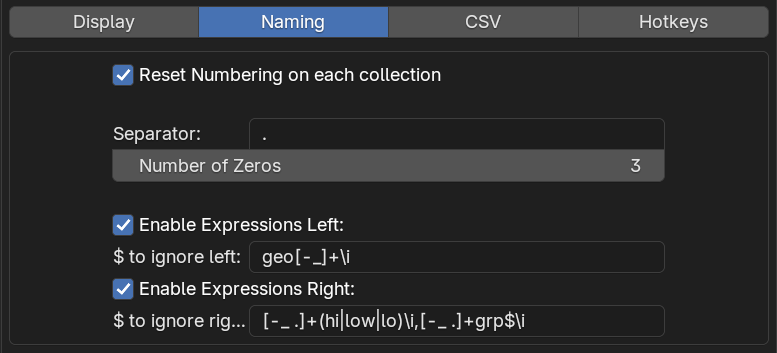
Reset Numbering on each collection
Section titled “Reset Numbering on each collection”This setting allows you reset the numbering on each collection, it affects the numbering in your input (you need to have numbers in the text input eg: ‘name_01’)

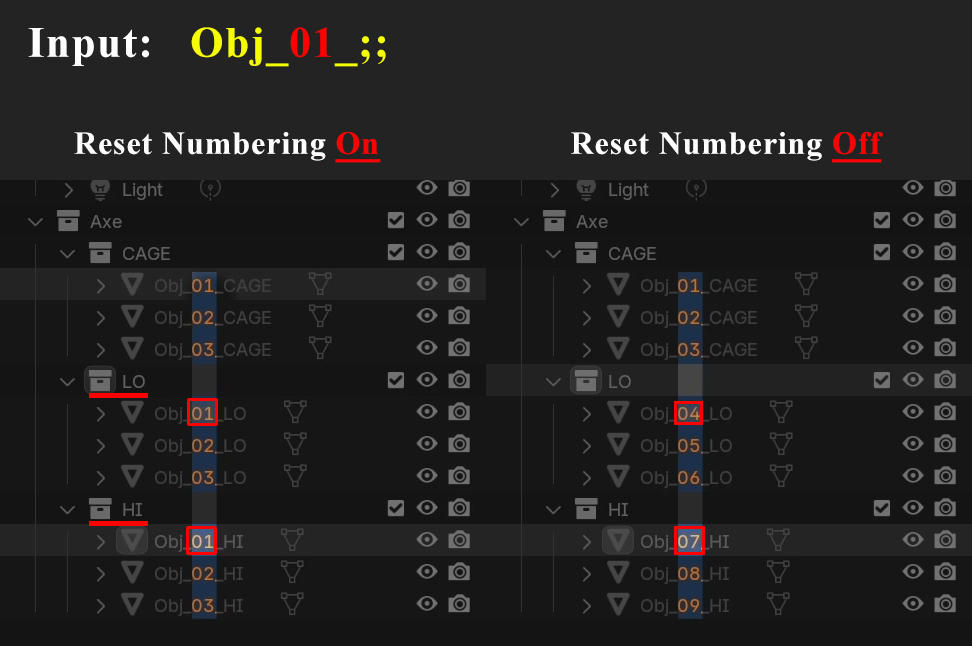
Numbering Format
Section titled “Numbering Format”
The Separator and Number of Zeros settings let you customize the numbering format. By default, it follows Blender’s format (.001), but you can change it to _01, -0001.
Example:
$ Expressions
Section titled “$ Expressions”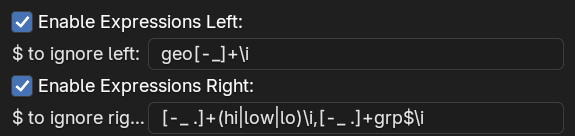
These two settings ($ to ignore left and $ to ignore right) let you customize how the $ token expands.
By default, $ removes any non-alphanumeric characters from the beginning and end of a name. However, these settings allow you to specify additional characters to remove, making it useful for automatically stripping common naming patterns like GEO_, _GRP, _HI, or _LO.
Both settings accept regular expressions, and you can define multiple patterns by separating them with commas.
To make an expression case-insensitive, add /i at the end.
Default Expressions in Rin.rename:
- $ to ignore left:
geo[-_]+\i - $ to ignore right:
[-_ .]+(hi|low|lo)\i,[-_ .]+grp$\i
User Settings
Section titled “User Settings”The Save/Load/Open User Settings options in the preferences let you store your custom settings in a configuration file named user-config.json, located in the add-on directory.

The json files looks like this:
{ "hotkey": [ "F2", 0, 0, 0 ], "display_hud_above_object": 0, "display_hud_left_corner": 1, "display_object_viewport_name": 1, "display_preview_text": 1, "display_selection_order": 0, "HUD_font_color": [ 0.3, 1, 1, 1 ], "HUD_font_size": 20, "separator": ".", "num_of_zeros": 3, "reset_numbering_on_each_collection": 1, "dollar_token_to_ignore_left": "geo[-_]+\\i", "dollar_token_to_ignore_right": "[-_ .]+(hi|low|lo)\\i", "csv_application_path": ""}This feature allows you to back up and restore your preferences. If you reinstall the add-on, your settings will reset to the defaults (you will lose your user settings).
By using Load User Settings, you can easily recover your previously saved configurations from the JSON file.
Error Reporting
Section titled “Error Reporting”If you encounter bugs or unexpected issues, please don’t hesitate to reach out. The more details you provide, the easier it will be for me to troubleshoot:
✅ Console error messages
✅ Screenshots (if necessary)
✅ Videos (if necessary)
I’ll do my best to respond promptly.
How to enable console logging:
Section titled “How to enable console logging:”- Run Blender from the console (command line).
- Enable the “Enable Console Logging” option in the add-on preferences to display helpful debugging information.

Suggestions & Ideas Welcome!
Section titled “Suggestions & Ideas Welcome!”Got feedback? Ideas for new features? Or just not happy with how something works? I’d love to hear from you!
📧 Email me directly
💬 Comment on my YouTube video
📝 Post on the Blender Artists thread
💻 Join the discussion on my Discord channel
Your input helps make RinRename better!
Future Works / Todo
Section titled “Future Works / Todo”Just some ideas, not yet commited:
New command to convert numbering format[NOV2025]Search and replace feature ability to ignore case for the search text (eg. search/ will match Search or SearCH)[NOV2025]- Simple expression for in search and replace
- Type token? (Light, Geo, Lattice, grp, etc)
- Rename vertex groups
- Rename textures, materials
- Rename all instead of selected
- Rename everything in a collection without having to select the objects
- Improve +text@position to support negatif numbers, and get dynamic position using regular expressions
- Make @ more flexible: to be able to use lowercase, to be able to start from a specific Alphabets
- Invert word and number token !~1 (every word except the first one?)
- etc…